.webp)
.webp)


Conversion Rate Optimisation (CRO): get more value from your traffic
.png)
More website visits don't automatically mean more customers. Conversion rate optimisation (CRO) helps you identify what's stopping visitors from making a purchase or getting in touch — and what you can do about it.
The problem isn't necessarily your website design. Some visitors can't find the information they need, while others abandon their purchase during checkout. In B2B, you might receive enquiries from businesses that aren't a good fit for your services. Moving a button won't help much if the real obstacle lies elsewhere.
In this article, we'll show you how to identify these obstacles, decide which improvements to prioritise and find out whether your changes actually deliver value to your business.
Conversion rate optimisation, or CRO, is the systematic process of increasing the percentage of website visitors who complete a desired action. This might mean making a purchase, submitting a qualified enquiry or booking a product demo.
In practice, CRO combines data analysis, improvements to content and user experience, technical changes and hypothesis testing.
For an online store, the goal is often to increase completed purchases. For a B2B business, the quality of enquiries may matter more than the number received. Sales teams need leads from potential customers who genuinely need what the business offers. A higher conversion rate has limited value if returns increase, lead quality declines or profitability suffers.
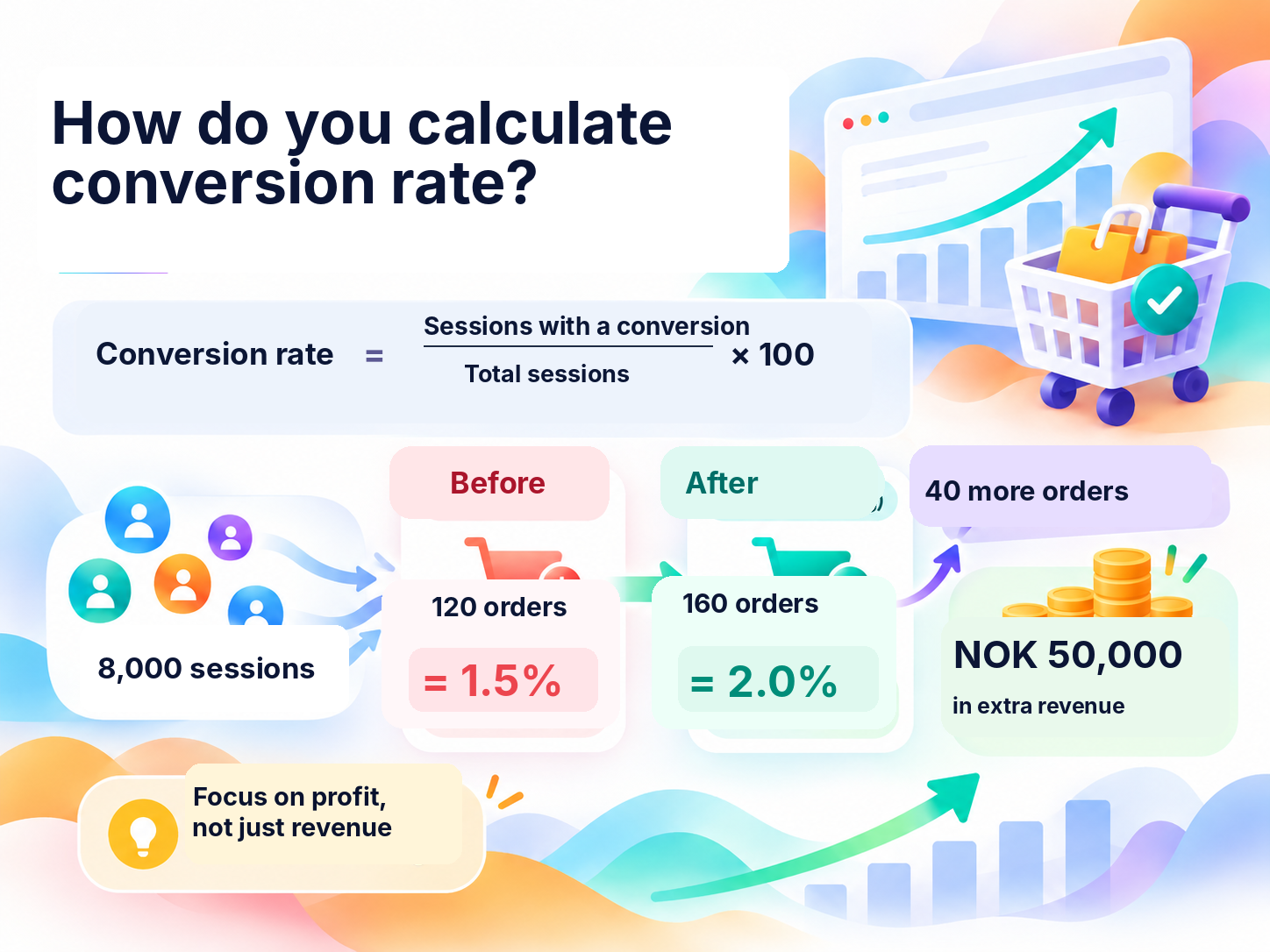
Conversion rate shows the percentage of sessions in which visitors complete an action you've defined as a conversion.
Conversion rate = (Sessions with at least one desired action / Total sessions) × 100
Imagine an online store receives 8,000 sessions in one month. At least one purchase is completed in 120 of those sessions. That gives the store a conversion rate of 1.5%.
If the number of sessions resulting in a purchase increases to 160 while traffic remains the same, the conversion rate rises to 2%. With an average order value of NOK 1,250 and one order per purchasing session, that's 40 additional orders and NOK 50,000 in extra revenue.
But NOK 50,000 in additional revenue is not the same as NOK 50,000 in profit. If 30% of revenue remains after variable costs, the increase generates a contribution of NOK 15,000 per month towards fixed costs and profit. If the CRO work costs NOK 30,000, the investment could pay for itself in around two months, assuming the improvement is sustained. Before getting started, it's therefore important to consider both the expected impact and the cost of making improvements.
Important: Use the same calculation method when comparing periods. In Google Analytics 4, the session key event rate measures the percentage of sessions in which a key event occurred. Select the relevant key event, such as a purchase, if you want to measure a specific conversion. If several key events are included, the figure may also reflect actions unrelated to sales. Calculating conversions per user, per session or per transaction can produce different results.
There is no single conversion rate that's good for every business. An online store selling inexpensive everyday products has a very different purchasing journey from a company providing high-value B2B solutions. Customers who already know your business may also behave differently from first-time visitors.
Start by comparing your own results for the same goal, using audiences and traffic sources that are as similar as possible. Take seasonal patterns, discounts, campaigns and changes in your traffic mix into account. If your conversion rate increases during a sale, that doesn't necessarily mean your website has become easier to use. Look at actual purchases, average order value, costs and lead quality as well. A conversion rate on its own tells you very little about profitability.
Low conversion rates can have several causes. Here are four common situations and what you should investigate to understand where the problem lies.
Compare the message that encouraged people to click with the content they find when they arrive. If visitors from a particular traffic source show little interest in your offer, check whether the landing page content matches their expectations. Perhaps someone was looking for a comparison of different solutions but ended up on a page asking them to fill in a contact form straight away.
Look at how many people visit product pages, how many add items to their basket and what questions customers ask before buying. Is information about delivery times, sizing or compatibility missing? Is it difficult to compare different options? Answering these questions may be more useful than adding another advertising banner or more product images.
Investigate where customers abandon the checkout process and whether abandonment differs between mobile and desktop users. This makes it easier to identify the underlying issue before making major changes to your website or increasing your advertising budget.
In B2B, you also need to look at what happens after someone clicks 'Submit'. How many enquiries become qualified leads? Which enquiries does your sales team consider irrelevant? If your contact form attracts all kinds of potential customers, you may need to explain more clearly who your solution is intended for. If qualified leads aren't turning into sales, investigate how quickly prospects are contacted and how they're followed up.
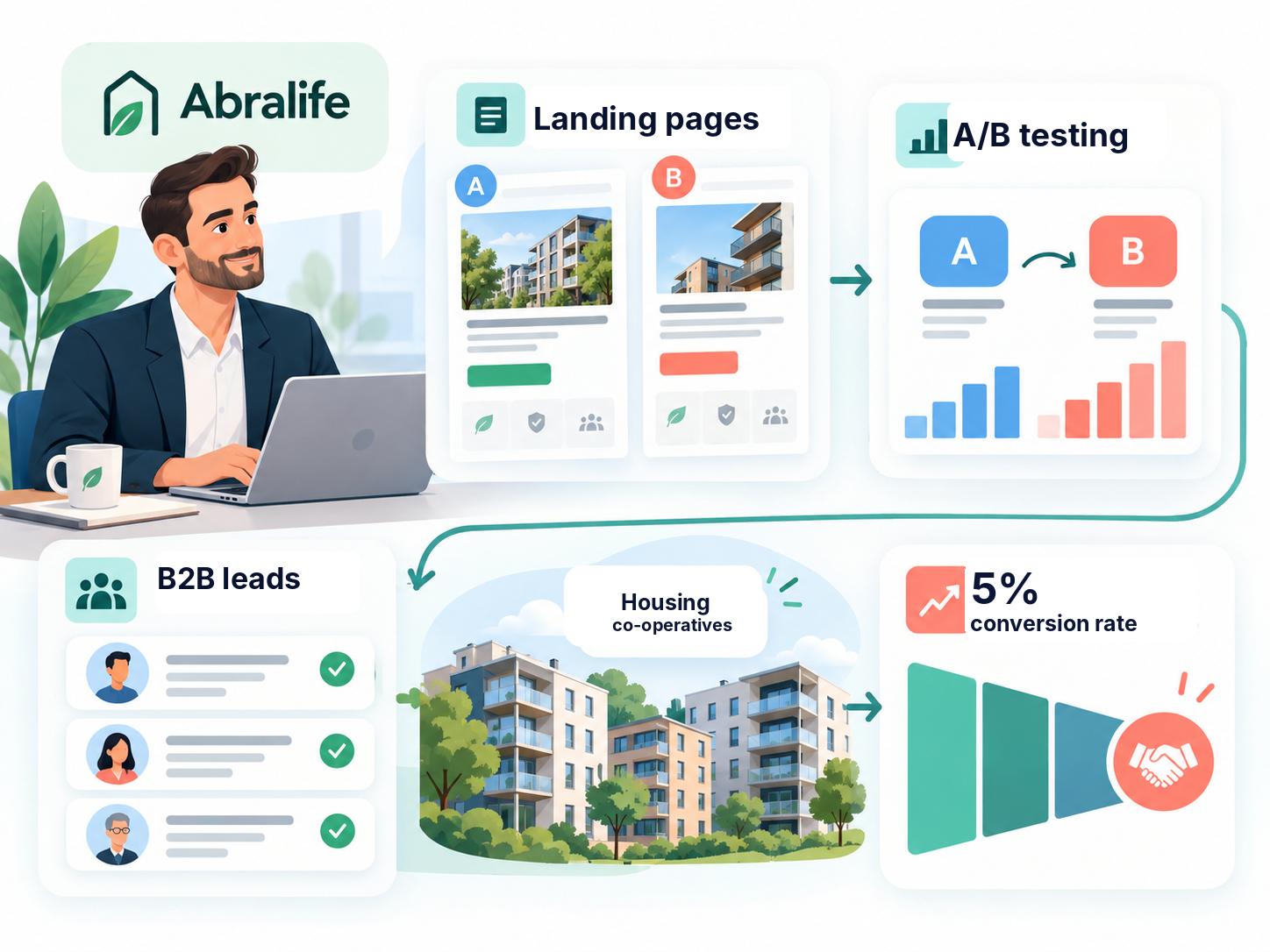
For our client Abralife, the goal was to generate more enquiries from relevant B2B customers, particularly housing cooperatives, and improve landing page conversions. We refined the landing pages, ran A/B tests and worked to reach the right audience through LinkedIn, Meta, Google Ads and email campaigns. The conversion rate reached 5%, giving the sales team more time to focus on customer relationships and sales.
Identify the primary conversion you want to improve on a particular page or customer journey. Agree on what counts as a completed action and how you'll verify the result. If your goal is to generate qualified enquiries, work with your sales team to establish what criteria a lead must meet. Otherwise, you risk optimising for the highest possible number of website actions rather than meaningful business outcomes.
You should also monitor the steps people take along the way, such as viewing products, adding items to their basket, starting checkout or opening a contact form. These metrics can reveal where customers encounter obstacles, but they don't replace your primary conversion goal.
Make sure your most important events are recorded correctly. Opening a contact form isn't the same as submitting it. If an action is counted twice, your results may look better than they really are.
Ask your team to compare GA4 figures with actual orders in your online store. For B2B businesses, you should also check the numbers against leads and sales recorded in your CRM system. If your reports show plenty of conversions but few sales, start by investigating what is being counted as a conversion and whether your tracking is accurate.
You should also consider whether users have consented to analytics cookies. When visitors decline tracking, GA4 has less complete data to work with. Depending on the configuration, reports may sometimes include modelled estimates alongside observed data. Before concluding that conversions have increased or decreased, check whether your consent banner or tag configuration has changed.
Ask your team to show how many visitors progress from a product page to the basket, then to checkout and finally to payment. You can investigate this using funnel exploration in GA4. For B2B businesses, it's equally important to track how many enquiries develop into qualified sales opportunities.
Compare results across mobile and desktop devices and look for differences between traffic sources. The numbers can show you where people drop off, but they won't always explain why. Customer questions, support enquiries and observations of people completing a purchase or filling in a form can help you understand what's happening.
Let's return to the online store from our earlier calculation, which received 8,000 sessions in one month. A product was added to the basket in 900 sessions, checkout was started in 400 sessions and 120 sessions resulted in a completed purchase. That means 280 of the 400 sessions where checkout began did not result in a purchase — a 70% drop-off between starting checkout and completing the order.
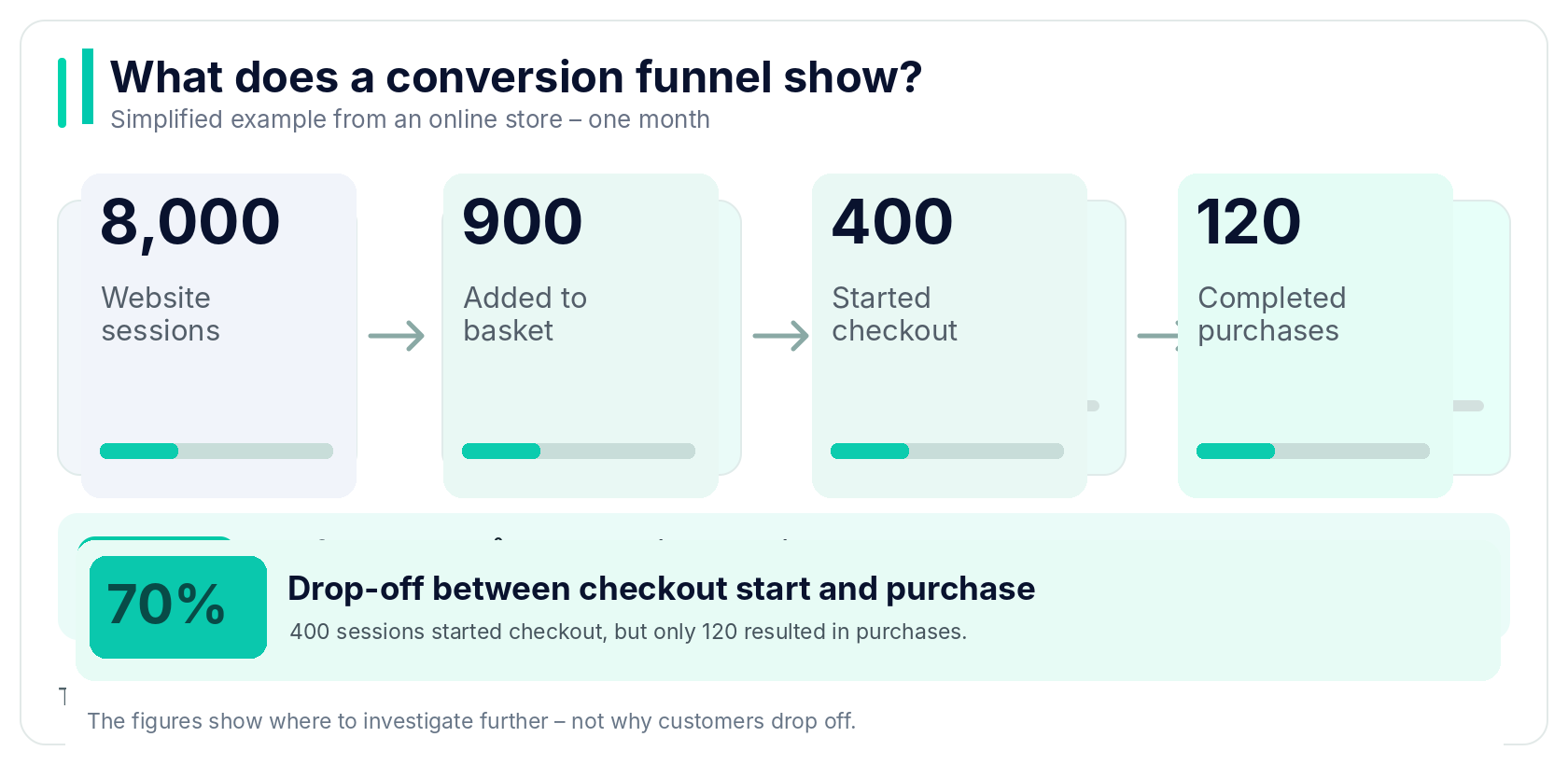
The funnel suggests that checkout is an area worth investigating, but it doesn't tell us why customers are leaving. First, we check that every step is being tracked correctly. Then we compare mobile and desktop performance and investigate customer service questions, delivery charges and potential payment errors. We also examine earlier stages of the journey. The highest percentage drop-off doesn't automatically represent the greatest opportunity for improvement. Only then do we decide what to test or fix.
In the example above, we found substantial drop-off during checkout. One team member suggests increasing the advertising budget, while another proposes creating new product pages. Both ideas might be useful later, but the data gives us good reason to investigate the checkout journey first.
If customer questions and a review of the checkout process suggest that unexpected delivery charges are contributing to abandonment, we can develop a hypothesis: “If we display delivery costs earlier, more customers will complete their orders.” We now know what needs to change and what we should measure to assess the impact.
If you have several hypotheses, prioritise them according to how many customers are affected, how well the problem is documented and what it will cost to address it. An obvious technical error should be fixed immediately. Changes to design or how an offer is presented, however, should be based on a well-founded assumption about what influences customer decisions.
In A/B testing, visitors are randomly assigned to one of two versions of a page so you can compare which performs better. Before starting, your management and marketing teams should agree on what they want to investigate, how much data is needed to draw a reliable conclusion and which other metrics must not deteriorate, such as average order value or lead quality.
Don't stop a test simply because one version is ahead after a couple of days. When traffic and conversion volumes are low, random variation can have a significant effect on the results. In these situations, usability tests, customer interviews or carefully introducing changes may provide a better basis for decision-making than an A/B test with too few observations.
Pay attention to what happens while the test is running, including campaigns, price changes, technical problems and major shifts in traffic. When both versions run at the same time, these factors will generally affect both groups. However, if one variation attracts a different type of visitor or experiences a technical issue, you can't automatically attribute the difference in performance to the change itself.
Not every improvement needs to be tested. For smaller websites, removing obvious obstacles and checking that purchases and form submissions work correctly is often more important.
After making a change, look beyond the number of clicks. More visitors might click 'Add to basket', but does that lead to more completed orders? You might generate more enquiries, but how many are actually relevant? What matters is the outcome across the entire customer journey.
Consider average order value, repeat purchases and lead quality as well. A discount might increase your conversion rate without making sales more profitable. That's why improvements should be assessed according to the value they create for your business, not simply how much the conversion rate increases.
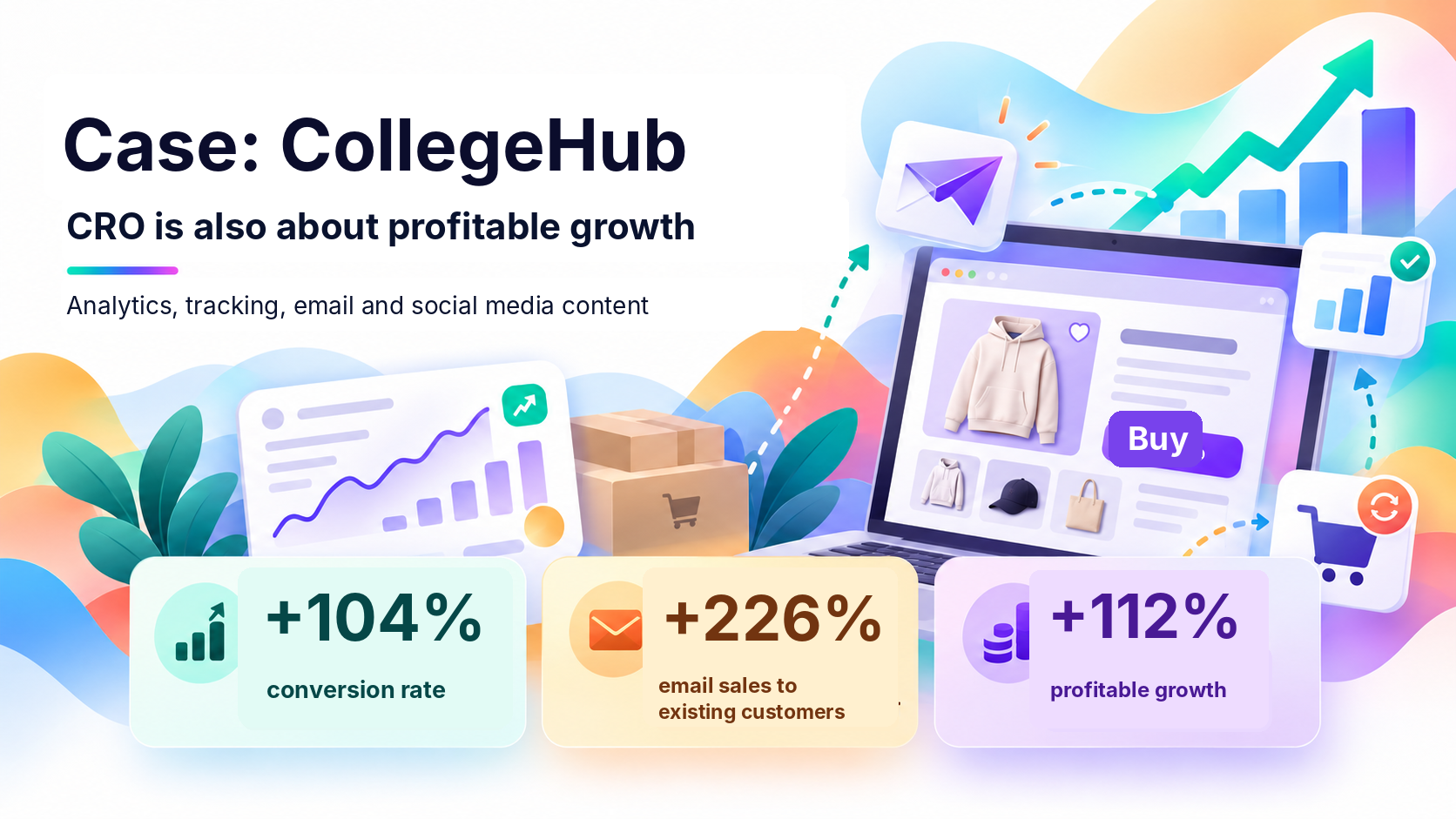
When working with CollegeHub, our goal wasn't just to increase sales, but to make the online store's continued growth profitable. The business was already growing, but its marketing activities lacked a coordinated strategy. We improved analytics and tracking, developed its email marketing and tested social media content. We placed particular emphasis on repeat purchases and measuring results across different channels. The results included a 104% higher conversion rate, a 226% increase in sales to existing customers through email marketing and a 112% increase in profitable growth.
Even if you don't have enough visitors to run a reliable A/B test, you can still identify obstacles that make it difficult for people to buy or get in touch. Start with these checks:
• Try completing a purchase or submitting an enquiry on mobile. Does the entire process work without errors?
• Ask your customer service or sales team which questions and objections come up most often.
• Check that prices, delivery information, purchasing terms and contact details are easy to find when customers need them.
• Make sure important events are tracked correctly before deciding which channels or pages are performing best.
No. SEO helps attract visitors from organic search results. CRO focuses on improving the path to purchase or enquiry for visitors from different traffic sources, not just search engines. Good SEO traffic doesn't guarantee sales.
UX, or user experience, is about making a website easy to understand and use. CRO can involve improving UX, but it also examines the impact on a specific business goal, such as purchases, registrations or qualified enquiries. A user-friendly website and a website with a high conversion rate aren't necessarily the same thing.
No. A/B testing is useful when you have a clear hypothesis and enough data to compare alternatives reliably. Checkout errors, broken forms and incorrect information should generally be fixed straight away.
Some technical issues can be resolved quickly. Identifying the causes of poor performance, testing a hypothesis and evaluating the results can take longer, particularly when website traffic is low or the B2B sales cycle is lengthy. CRO therefore works best as an ongoing process rather than a one-off project.
You don't need to redesign your entire website at once. Find a point where customers get stuck, investigate why it happens and see whether your improvements make a difference. That way, your decisions are based on what you learn about your customers rather than guesswork about what might look like 'better design'.
At WeAssist, we combine insights into user behaviour, landing page improvements and hypothesis testing with your business goals. Want to find out which changes could make a real difference to your business? Get in touch with our marketing team for a conversation.
.webp)


