What is a landing page – and when does your business need one?
Does your campaign need a dedicated landing page, or will an existing page do? Learn how to choose and build the right page, with practical B2B and online store examples.
Imagine you're planning a campaign for a particular service. Before creating the ads, you need to decide where to send people. Does the campaign need its own landing page, or will your existing service page do the job? This guide will help you make that choice and show you how to build a landing page when a separate one makes sense.
In digital marketing, a landing page is a page designed around a specific offer, audience or campaign. It helps visitors understand what's on offer and what to do next. That might mean booking a demo, sending an enquiry, registering for an event or buying a product.
The term also has a different meaning in analytics. In Google Analytics 4, a “landing page” is simply the first page someone visits during a session. It could be the homepage, a blog post or a product page. In this article, though, we're talking about pages deliberately built for one clear purpose.
A homepage usually introduces the business and helps different types of visitors find what they need. A service page explains a particular service in more detail and can work well for both organic search and advertising. A campaign landing page has a narrower focus: it speaks to people who have already shown interest in a specific message or offer.
That doesn't mean every ad needs a brand-new page. If you're advertising a particular product and its product page already shows the right photos, availability, price and delivery information, sending customers straight there may be the better option. An extra page would only add another step before purchase.
Ask yourself three questions before you start building:
1. What is the campaign about? Define the offer, who you want to reach and what you want to achieve before deciding what sort of page you need.
2. Does the campaign need its own landing page? Check whether an existing service, category or product page already explains the offer well enough. Don't duplicate a page just to create a new URL.
3. Where should the ads send people? Once you've chosen the page, make sure the ad's message matches what visitors will find there and gives them a clear next step.
As a rule of thumb, use an existing page when it meets the need without sending visitors on a detour. Create a dedicated landing page when the campaign calls for a different offer, a different audience or an action that doesn't fit naturally on a page you already have.
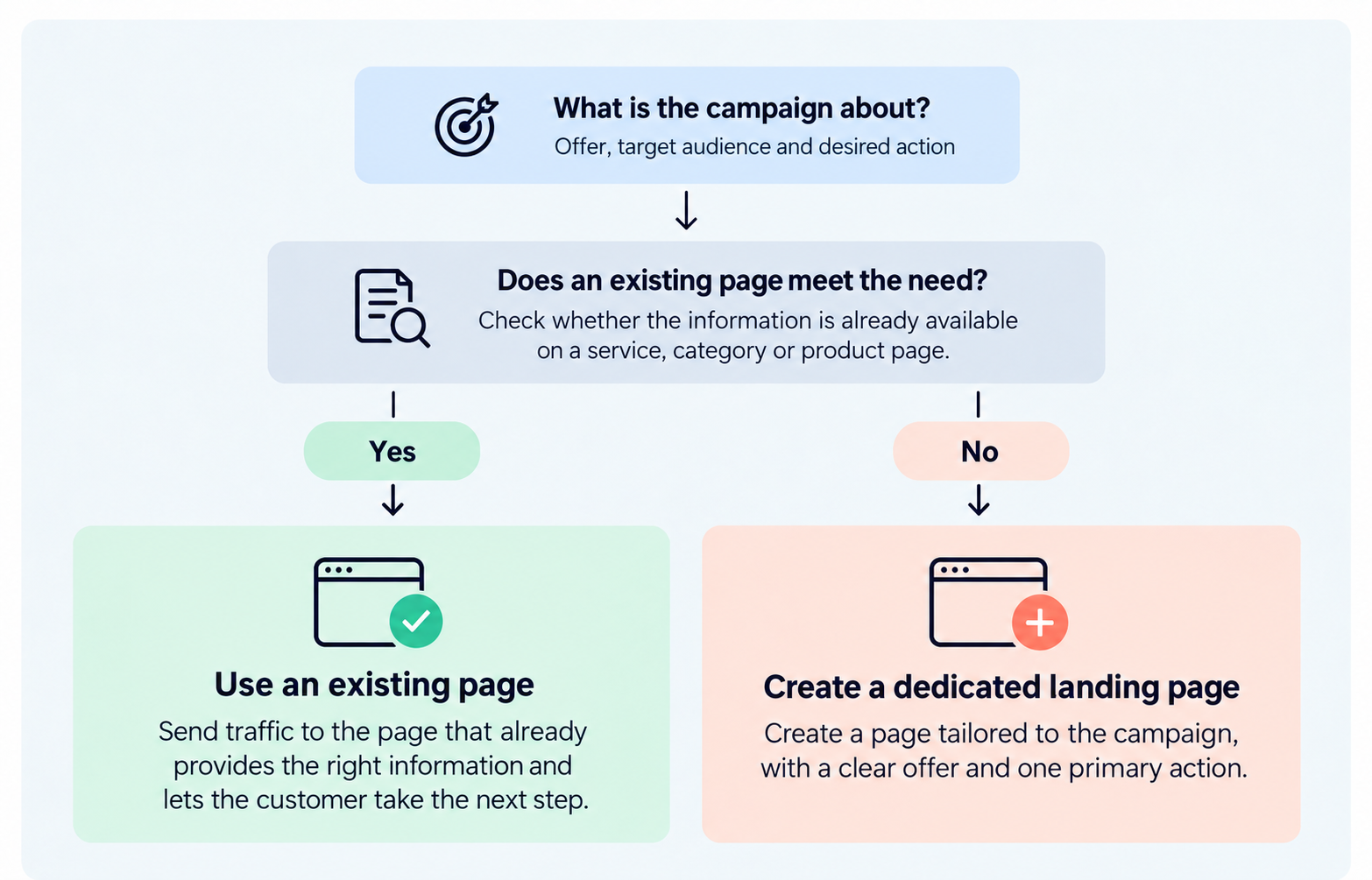
Figure 1. Does the campaign need a dedicated landing page?
Start with the action that matters most to the campaign. Do you want people to book a call, request a quote or browse selected products? Choose one main action. You can repeat the same button in several places, but avoid giving visitors three equally prominent calls to action.
Someone who clicks an ad saying “Book a warehouse management demo for wholesalers” doesn't need a general introduction to every piece of software the company sells. They want to know whether the solution is right for them, what the demo covers and how to book it. Write your headline with those expectations in mind.
Start with the offer and what visitors can do next. Then give them what they need to make a decision: what the product or service does, who it's for and any important details about pricing, delivery or the process. A relevant image or screenshot can be more useful than another paragraph. Customer testimonials and results can also help, provided you can back them up.
A “Book a demo” button should lead to an actual demo booking, not an unexplained contact page. Ask only for the details you need to follow up. Tell people what will happen after they submit the form so they know what they're signing up for.
Check that the text, images and buttons work on smaller screens. Test links, forms, submission confirmations and any checkout steps. The page should load quickly, and the offer and its terms should be easy to find. This is especially important when much of your campaign traffic comes from mobile devices.
Agree on what success looks like before you launch. For a demo campaign, that might be completed bookings rather than button clicks. For an online store, it could be sales of the products featured in the campaign. You don't need a complicated analytics setup to get started, but you do need a way to tell whether the page is doing its job.
Imagine a company selling warehouse management software to wholesalers. Its ad invites people to book a demonstration, but its homepage covers several products and industries. It doesn't explain why a wholesaler should book this particular demo.
This is where a dedicated landing page can help. At the top, you might have a headline such as “See warehouse management for wholesalers in action”, followed by a short explanation of what the demo includes and a “Book a demo” button. Further down, the page can explain which tasks the software helps with, who the solution suits and how the demonstration works. The form asks for essential contact details and gives the prospect room to describe their needs.
You don't need to build a smaller version of the company's entire website. You just need to give people who clicked the demo offer enough information to decide whether to book.
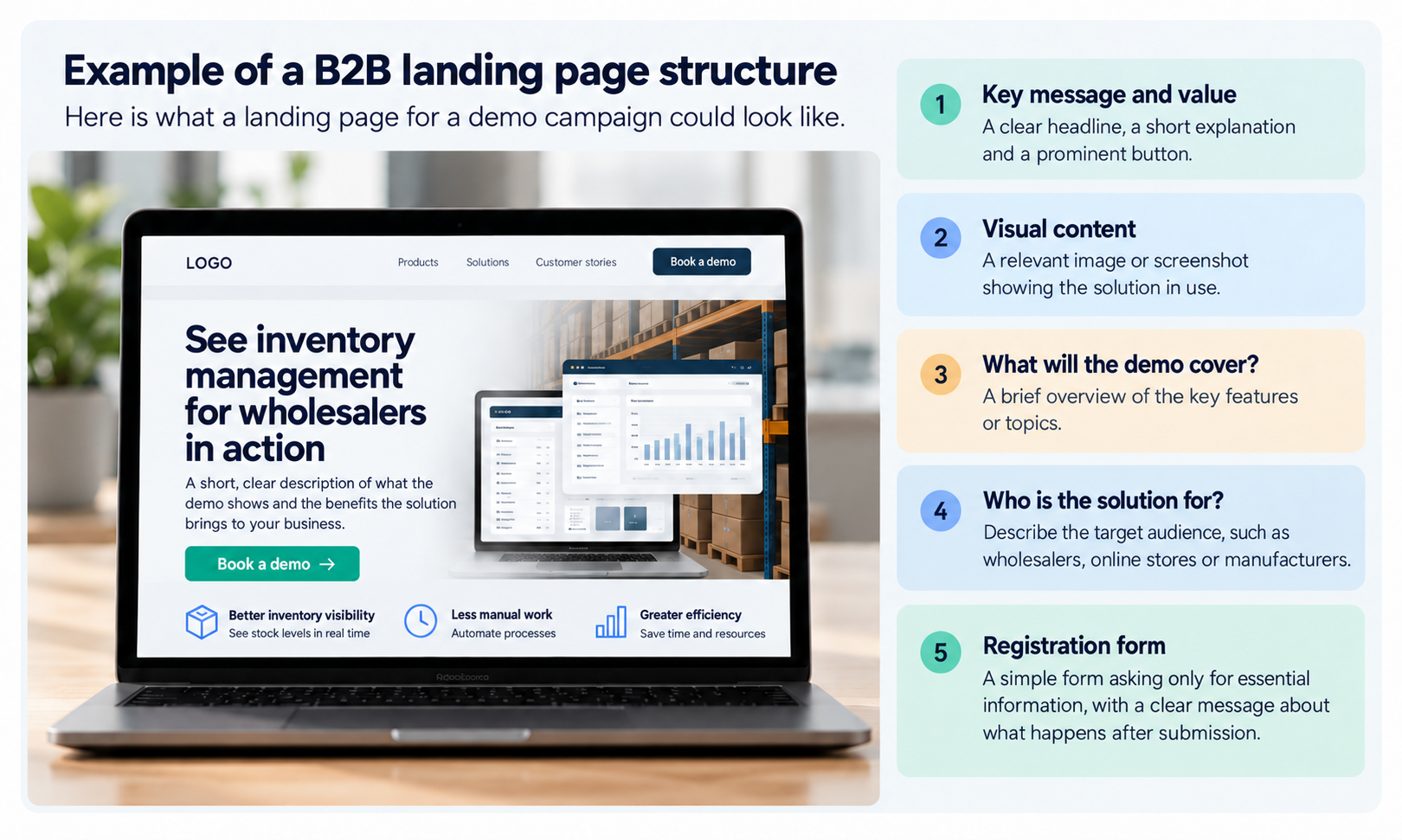
Figure 2. Example of a B2B landing page for demo bookings.
An online store wants to advertise a particular coffee grinder. The product page already has the price, availability, photos, delivery details and a buy button. In that situation, building a separate campaign page with the same information rarely makes sense. Send customers straight to the product instead.
Now imagine the store wants to launch a gift campaign featuring different combinations of grinders, coffee beans and accessories. A dedicated landing page could bring the bundles together, explain the differences and display the campaign terms in one place. The main call to action might be “Explore the gift sets”, with a clear route to the individual products.
Those two campaigns call for different approaches. What matters isn't how many pages you can create, but which one makes the customer's choice easier.
No. It can sit on your existing website as a separate page. Keeping it on the same site often makes design, content and tracking easier to manage.
Yes, if its content matches what people are searching for and search engines can index it. But a short page built for an ad campaign and a more detailed service page won't necessarily play the same role in organic search. Decide what you need the page to do before choosing how to publish it.
You may not need another page. First, check whether the offer, the content and the next step make sense together. For advice on calls to action, design and testing, see our guide to landing page optimisation for conversions.
A good landing page starts with a real need, not a ready-made template. Some campaigns deserve a dedicated page; others are better served by an existing product or service page. Once you've chosen the right approach, it's much easier to create content that meets visitors' expectations and helps them take the next step.
At We Assist, we plan, design and develop websites in Webflow. If you need help building a page that supports your business goals and marketing, take a look at how we approach website development in Webflow.